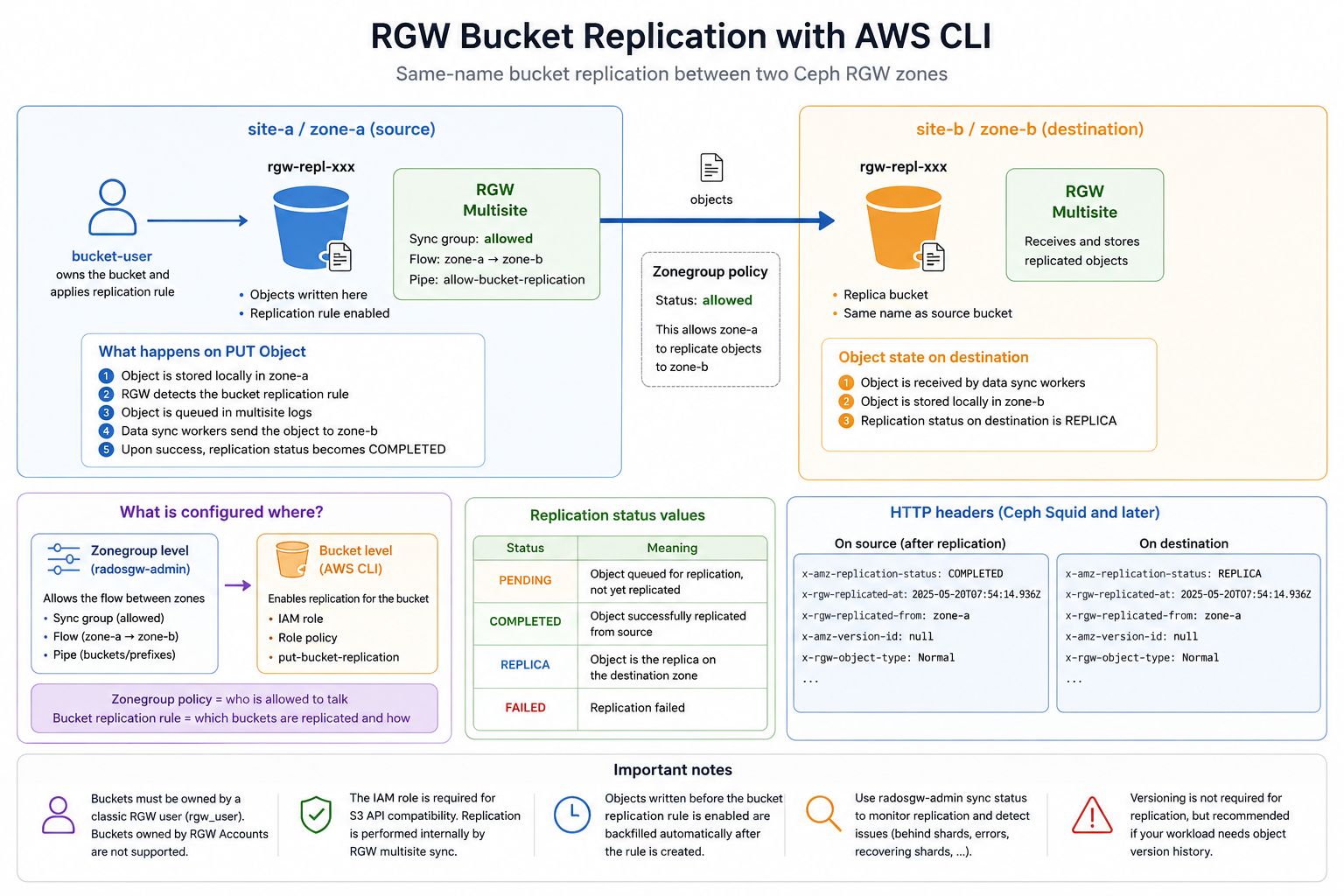
Ceph RGW multisite can replicate only selected buckets instead of enabling replication for every object in a zonegroup. This gives you a finer replication configuration, and the S3 API lets bucket users control it.
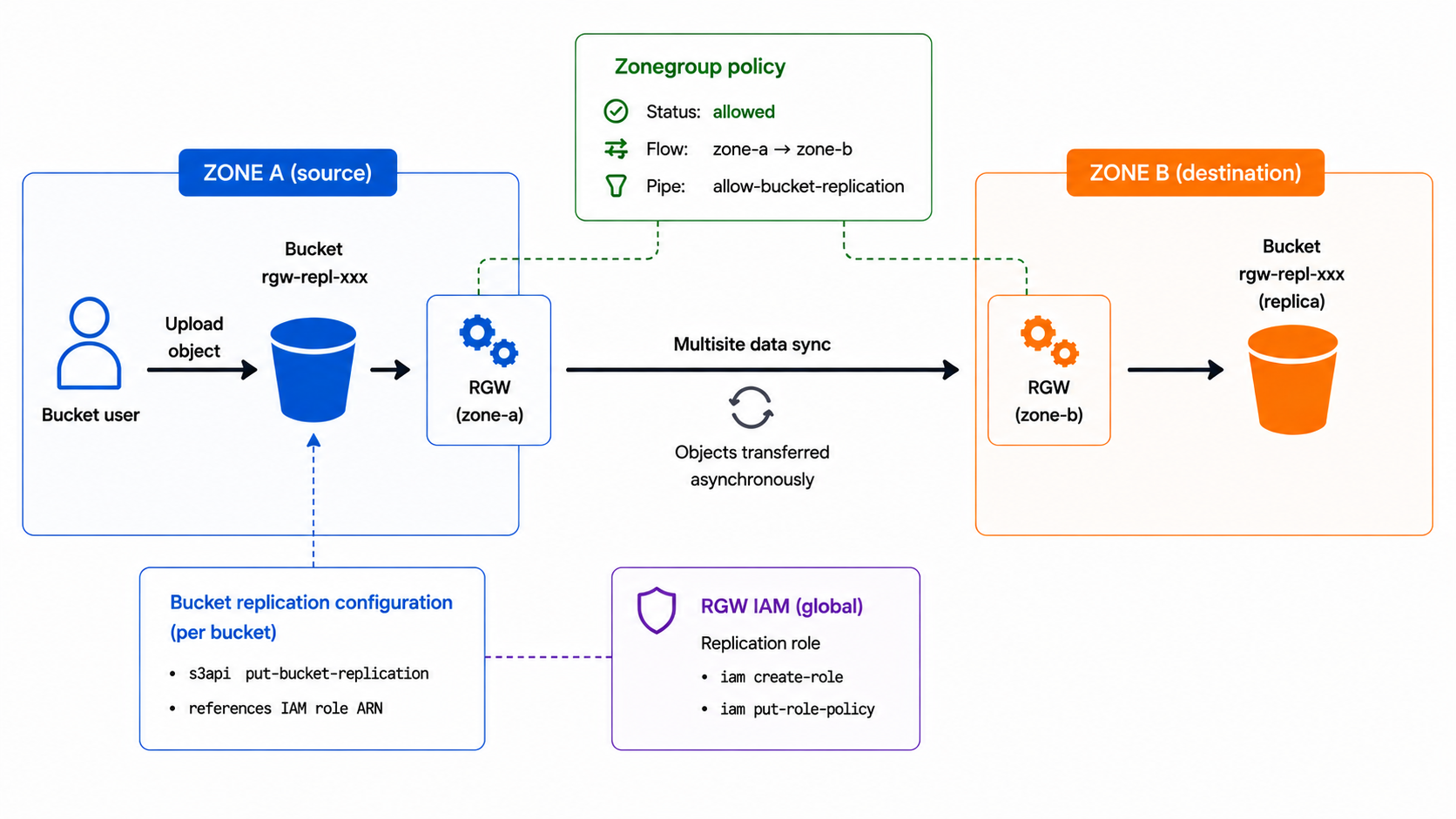
The example below assumes that the multisite realm and two zones already exist. The zonegroup policy only allows the flow; the bucket replication rule enables it for one bucket.
Example layout
Allow the flow at zonegroup level
This assumes that SOURCE_ZONE and DEST_ZONE already exist in the same
zonegroup, and that no zonegroup sync policy is globally enabled between them.
Run this on the master zone. If you use cephadm, prefix the radosgw-admin
commands with cephadm shell --.
export REALM=example-realm
export SOURCE_ZONE=zone-a
export DEST_ZONE=zone-b
export GROUP_ID=bucket-replication-allowed
export FLOW_ID=zone-a-to-zone-b
export PIPE_ID=allow-bucket-replication

radosgw-admin sync group create \
  --group-id="${GROUP_ID}" \
  --status=allowed

radosgw-admin sync group flow create \
  --group-id="${GROUP_ID}" \
  --flow-id="${FLOW_ID}" \
  --flow-type=directional \
  --source-zone="${SOURCE_ZONE}" \
  --dest-zone="${DEST_ZONE}"

radosgw-admin sync group pipe create \
  --group-id="${GROUP_ID}" \
  --pipe-id="${PIPE_ID}" \
  --source-zones="${SOURCE_ZONE}" \
  --source-bucket='*' \
  --dest-zones="${DEST_ZONE}" \
  --dest-bucket='*'

radosgw-admin period update \
  --rgw-realm="${REALM}" \
  --commit
At this point, RGW knows that zone-a is allowed to replicate objects to
zone-b, but no bucket is replicated yet.
Create users
Use two dedicated RGW users. The role manager only creates, updates, and reads IAM roles needed for the replication; the bucket user owns the bucket and applies the replication rule.
export ROLE_MANAGER_USER=role-manager
export BUCKET_USER=bucket-user

radosgw-admin user create \
  --uid="${ROLE_MANAGER_USER}" \
  --display-name="Bucket replication role manager" \
  --caps='roles=*'

radosgw-admin user create \
  --uid="${BUCKET_USER}" \
  --display-name="Bucket user"
Set AWS CLI variables
Load the returned keys into the AWS CLI environment:
export AWS_DEFAULT_REGION=us-east-1

export SOURCE_ENDPOINT=https://s3-a.example.com
export DEST_ENDPOINT=https://s3-b.example.com
export SOURCE_ZONE=zone-a
export DEST_ZONE=zone-b

use_role_manager() {
  export AWS_ACCESS_KEY_ID="<role-manager access key>"
  export AWS_SECRET_ACCESS_KEY="<role-manager secret key>"
}

use_bucket_user() {
  export AWS_ACCESS_KEY_ID="<bucket-user access key>"
  export AWS_SECRET_ACCESS_KEY="<bucket-user secret key>"
}

export TS="$(date -u +%Y%m%d%H%M%S)"
export BUCKET="rgw-repl-${TS}"
export ROLE_NAME="rgw-repl-${TS}"
export POLICY_NAME=rgw-repl-policy
Check the source endpoint:
use_bucket_user

aws --endpoint-url "${SOURCE_ENDPOINT}" s3api list-buckets \
  --no-cli-pager
Create the source bucket
Create the source bucket:
use_bucket_user

aws --endpoint-url "${SOURCE_ENDPOINT}" s3api create-bucket \
  --bucket "${BUCKET}"
Versioning is not required for this RGW multisite bucket replication flow. If your workload needs object versions, enable it explicitly:
aws --endpoint-url "${SOURCE_ENDPOINT}" s3api put-bucket-versioning \
  --bucket "${BUCKET}" \
  --versioning-configuration Status=Enabled
In this same-name multisite example, bucket metadata is expected to sync to
zone-b. If you replicate to a different destination bucket, create that bucket
first and align the versioning setting with the source bucket.
Create the replication role
Create the IAM role expected by the S3 replication API. RGW converts the request into a bucket sync policy, but the AWS CLI still sends the standard role field:
TRUST_POLICY="$(
  printf '{"Version":"2012-10-17","Statement":[{"Effect":"Allow","Principal":{"AWS":["arn:aws:iam:::user/%s"]},"Action":["sts:AssumeRole"]}]}' \
    "${BUCKET_USER}"
)"

ROLE_POLICY="$(
  printf '{"Version":"2012-10-17","Statement":[{"Effect":"Allow","Action":["s3:GetReplicationConfiguration","s3:GetBucketVersioning","s3:ListBucket"],"Resource":["arn:aws:s3:::%s"]},{"Effect":"Allow","Action":["s3:GetObjectVersion","s3:GetObjectVersionAcl","s3:GetObjectVersionTagging","s3:PutObject","s3:PutObjectAcl","s3:PutObjectTagging","s3:DeleteObject"],"Resource":["arn:aws:s3:::%s/*"]}]}' \
    "${BUCKET}" "${BUCKET}"
)"

use_role_manager

aws --endpoint-url "${SOURCE_ENDPOINT}" iam create-role \
  --role-name "${ROLE_NAME}" \
  --assume-role-policy-document "${TRUST_POLICY}"

aws --endpoint-url "${SOURCE_ENDPOINT}" iam put-role-policy \
  --role-name "${ROLE_NAME}" \
  --policy-name "${POLICY_NAME}" \
  --policy-document "${ROLE_POLICY}"

ROLE_ARN="$(
  aws --endpoint-url "${SOURCE_ENDPOINT}" iam get-role \
    --role-name "${ROLE_NAME}" \
    --query 'Role.Arn' \
    --output text
)"
Instead of the AWS IAM commands above, the role can also be created directly
with radosgw-admin. Keep the TRUST_POLICY and ROLE_POLICY variables, then
replace only the aws iam calls with:
radosgw-admin role create \
  --role-name="${ROLE_NAME}" \
  --assume-role-policy-doc="${TRUST_POLICY}"

radosgw-admin role policy put \
  --role-name="${ROLE_NAME}" \
  --policy-name="${POLICY_NAME}" \
  --policy-doc="${ROLE_POLICY}"

ROLE_ARN="$(
  radosgw-admin role get --role-name="${ROLE_NAME}" |
    jq -r '.arn // .Arn'
)"
When roles are not created inside an RGW account, their account id is empty
and the ARN can look like arn:aws:iam:::role/.... Treat those roles as shared
at the RGW cluster or tenant scope, use unique names, and keep roles=* away
from regular bucket users.
Enable bucket replication
Apply the bucket replication rule with the bucket user:
use_bucket_user

REPLICATION_CONFIG="$(
  printf '{"Role":"%s","Rules":[{"ID":"zone-a-to-zone-b","Status":"Enabled","Priority":1,"Filter":{"Prefix":""},"Destination":{"Bucket":"arn:aws:s3:::%s"},"DeleteMarkerReplication":{"Status":"Disabled"}}]}' \
    "${ROLE_ARN}" "${BUCKET}"
)"

aws --endpoint-url "${SOURCE_ENDPOINT}" s3api put-bucket-replication \
  --bucket "${BUCKET}" \
  --replication-configuration "${REPLICATION_CONFIG}"
Test replication
Upload one object to the source endpoint:
KEY="objects/${TS}.txt"
printf 'bucket replication test %s\n' "${TS}" >/tmp/rgw-repl.txt

aws --endpoint-url "${SOURCE_ENDPOINT}" s3api put-object \
  --bucket "${BUCKET}" \
  --key "${KEY}" \
  --body /tmp/rgw-repl.txt
Wait and check that the object is visible from the destination endpoint:
aws --endpoint-url "${DEST_ENDPOINT}" s3api head-object \
  --bucket "${BUCKET}" \
  --key "${KEY}" \
  --query '{ReplicationStatus:ReplicationStatus,LastModified:LastModified,VersionId:VersionId}' \
  --no-cli-pager
Result example :
{
    "ReplicationStatus": "REPLICA",
    "LastModified": "2026-05-20T16:04:59+00:00",
    "VersionId": "4Dqdp1lk9l2CgWYacaWVOJELz5-9mzs"
}
head-object confirms that the object is reachable from the destination zone.
When exposed by the S3 API, ReplicationStatus maps the x-amz-replication-status response header.
Ceph Squid and later also add HTTP headers that make the sync state easier to inspect.
On the source endpoint, the object usually moves from PENDING to COMPLETED:
aws --endpoint-url "${SOURCE_ENDPOINT}" s3api head-object \
  --bucket "${BUCKET}" \
  --key "${KEY}" \
  --debug 2>&1 >/dev/null | \
  grep -iE 'x-amz-replication-status|x-rgw-replicated-(from|at)'
Example debug header block:
{
  'content-length': '39',
  'accept-ranges': 'bytes',
  'last-modified': 'Wed, 20 May 2026 16:04:59 GMT',
  'x-amz-version-id': '<version-id>',
  'x-rgw-object-type': 'Normal',
  'x-amz-replication-status': 'PENDING',
  'etag': '"<etag>"',
  'x-amz-request-id': '<request-id>',
  'content-type': 'binary/octet-stream',
  'server': 'Ceph Object Gateway',
  'date': 'Wed, 20 May 2026 16:13:52 GMT'
}
...
{
  'content-length': '39',
  'accept-ranges': 'bytes',
  'last-modified': 'Wed, 20 May 2026 16:04:59 GMT',
  'x-amz-version-id': '<version-id>',
  'x-rgw-object-type': 'Normal',
  'x-amz-replication-status': 'COMPLETED',
  'etag': '"<etag>"',
  'x-amz-request-id': '<request-id>',
  'content-type': 'binary/octet-stream',
  'server': 'Ceph Object Gateway',
  'date': 'Wed, 20 May 2026 16:42:00 GMT'
}
On the destination endpoint, the replicated object should show REPLICA.
Ceph-specific headers may also include x-rgw-replicated-at and
x-rgw-replicated-from:
aws --endpoint-url "${DEST_ENDPOINT}" s3api head-object \
  --bucket "${BUCKET}" \
  --key "${KEY}" \
  --debug 2>&1 >/dev/null | \
  grep -iE 'x-amz-replication-status|x-rgw-replicated-(from|at)'
Example debug header block:
{
  'content-length': '39',
  'accept-ranges': 'bytes',
  'last-modified': 'Wed, 20 May 2026 16:04:59 GMT',
  'x-amz-version-id': '<version-id>',
  'x-rgw-object-type': 'Normal',
  'x-amz-replication-status': 'REPLICA',
  'x-rgw-replicated-from': '<source-zone-id>:<bucket-name>:<object-instance>',
  'x-rgw-replicated-at': 'Wed, 20 May 2026 16:05:02 GMT',
  'etag': '"<etag>"',
  'x-amz-request-id': '<request-id>',
  'content-type': 'binary/octet-stream',
  'server': 'Ceph Object Gateway',
  'date': 'Wed, 20 May 2026 16:43:54 GMT'
}
These HTTP sync status headers were introduced in Ceph Squid.
Useful checks
The S3 replication configuration can be checked from the source endpoint:
aws --endpoint-url "${SOURCE_ENDPOINT}" s3api get-bucket-replication \
  --bucket "${BUCKET}" \
  --no-cli-pager
On the RGW side, the effective bucket sync policy is usually the most useful thing to inspect:
radosgw-admin sync policy get --bucket="${BUCKET}"
radosgw-admin sync info --bucket="${BUCKET}"
radosgw-admin sync status
Example output for radosgw-admin sync info --bucket:
# radosgw-admin sync info --bucket rgw-repl-20260520155912
{
    "sources": [],
    "dests": [
        {
            "id": "zone-a-to-zone-b",
            "source": {
                "zone": "zone-a",
                "bucket": "rgw-repl-20260520155912:79994c4d-d233-4cda-bcc6-5d26b167b6b7.54119.6"
            },
            "dest": {
                "zone": "zone-b",
                "bucket": "rgw-repl-20260520155912"
            },
            "params": {
                "source": {
                    "filter": {
                        "tags": []
                    }
                },
                "dest": {},
                "priority": 1,
                "mode": "user",
                "user": "bucket-user"
            }
        }
    ],
    "hints": {
        "sources": [
            "rgw-repl-20260520155912:79994c4d-d233-4cda-bcc6-5d26b167b6b7.54119.6"
        ],
        "dests": [
            "rgw-repl-20260520155912"
        ]
    },
    "resolved-hints-1": {
        "sources": [],
        "dests": [
            {
                "id": "zone-a-to-zone-b",
                "source": {
                    "zone": "zone-a",
                    "bucket": "rgw-repl-20260520155912:79994c4d-d233-4cda-bcc6-5d26b167b6b7.54119.6"
                },
                "dest": {
                    "zone": "zone-b",
                    "bucket": "rgw-repl-20260520155912"
                },
                "params": {
                    "source": {
                        "filter": {
                            "tags": []
                        }
                    },
                    "dest": {},
                    "priority": 1,
                    "mode": "user",
                    "user": "bucket-user"
                }
            }
        ]
    },
    "resolved-hints": {
        "sources": [],
        "dests": []
    }
}
Notes
This is not a pure AWS S3 same-region or cross-region replication setup. RGW maps the S3 replication API to multisite bucket sync, and bucket sync works across RGW zones, not within a single RGW zone.
The zonegroup policy above is deliberately allowed, not enabled. This makes
the flow available, but the bucket starts replicating only after the S3
replication rule is created.
Bucket metadata can appear in the other zone even when object data is not being replicated. This is normal in RGW multisite.
Objects written before the bucket replication rule was enabled are usually backfilled automatically after the rule is created. For a large existing bucket, still check the bucket sync status before considering the backfill complete.
Bucket-level replication currently works only for buckets owned by a classic
RGW user (rgw_user). Buckets owned by RGW Accounts/IAM accounts are currently
not supported and may return:
NOTICE: replication configuration is only supported for rgw_user